Integration Architecture
Why Integrate Siebel?
Siebel CRM rarely operates in isolation. Enterprise deployments require integration with ERP (billing, inventory), marketing automation, data warehouses, and third-party services to create a unified business ecosystem.
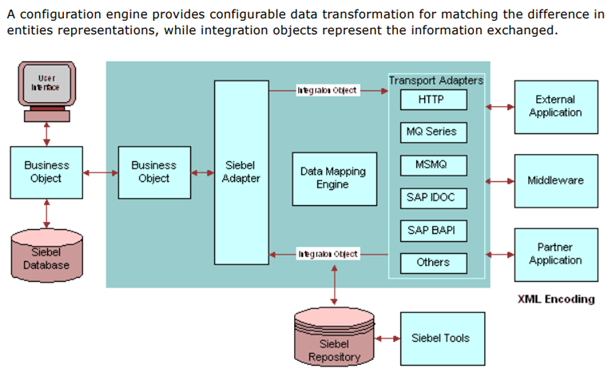
Integration Patterns
1. Real-Time Synchronous
- Use case: Validate credit card payment during order
- Method: Web Service call (SOAP/REST)
- Flow: User clicks "Pay" → Siebel calls Payment Gateway API → Wait for approval → Display result
- Pros: Immediate response
- Cons: User waits, dependent on external system availability
2. Asynchronous Batch
- Use case: Nightly export of new customers to ERP
- Method: EIM, flat file export/import
- Flow: 11 PM: Siebel exports 500 new accounts to CSV → ERP imports at 1 AM
- Pros: No user impact, handles large volumes
- Cons: Data not real-time
3. Event-Driven (Middleware)
- Use case: New SR triggers email via messaging queue
- Method: JMS, Oracle Integration Cloud, MuleSoft
- Flow: SR created → Siebel publishes event to queue → Email service subscribes, sends notification
- Pros: Decoupled, scalable
- Cons: Requires middleware infrastructure
Siebel Integration Capabilities
Web Services (Inbound/Outbound)
- Inbound: External systems call Siebel (e.g., Website creates lead via SOAP)
- Outbound: Siebel calls external systems (e.g., Validate address with USPS API)
- Protocols: SOAP, REST, XML
EAI (Enterprise Application Integration)
- Siebel EAI Framework: Built-in adapters for SAP, Oracle, JD Edwards
- Workflow Integration: Trigger external processes from Siebel workflows
- Example: Opportunity closed → EAI creates sales order in Oracle E-Business Suite
EIM (Enterprise Integration Manager)
- Batch import/export: Bulk data migration
- Use case: Import 10,000 accounts from legacy CRM
- Tables: EIM_ACCOUNT → S_ORG_EXT (Siebel accounts table)
Business Services
- Custom code to call external APIs, transform data
- Example: "ValidateEmailService" calls email verification API
Common Integration Points
Siebel Integrated With:
- ERP (SAP, Oracle): Orders, billing, inventory sync
- Marketing Automation (Marketo, Eloqua): Campaign data, lead scoring
- Data Warehouse: Analytics, reporting (extract Siebel data nightly)
- Email Services (SendGrid, Mailchimp): Campaign execution
- Payment Gateways (Stripe, PayPal): Real-time payment processing
- Telephony (CTI): Screen pop on incoming calls
- Identity Management (LDAP, Active Directory): User authentication
Example: Order-to-Cash Integration
- Step 1: Sales rep creates quote in Siebel (5× iPhone, 5× Unlimited Plans)
- Step 2: Customer accepts quote → Rep converts to Order
- Step 3: Siebel calls ERP via Web Service: "Create Sales Order SO-12345"
- Step 4: ERP validates inventory (5× iPhones in stock ✓)
- Step 5: ERP ships devices, updates Siebel order status to "Shipped"
- Step 6: ERP generates invoice, sends to billing system
- Step 7: Billing system charges customer, updates Siebel with payment status "Paid"