Siebel Mobile CRM
Mobile CRM Overview
Siebel Mobile enables sales reps and field techs to access CRM data on smartphones/tablets, with offline capabilities for areas without connectivity. Critical for field sales and service teams.
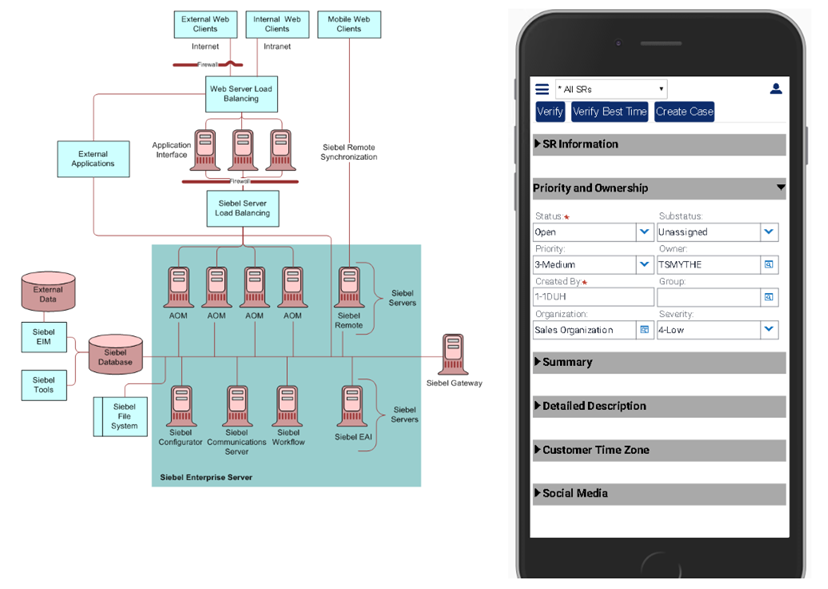
Mobile Deployment Models
1. Disconnected Mobile (Offline-First)
- Use case: Field sales reps in areas with poor connectivity
- Architecture: Local database on device, periodic sync with server
- Sync frequency: Daily (overnight) or manual sync before/after field visits
- Example: Rep visits 5 customers today, logs activities offline, syncs at end of day
2. Connected Mobile (Online-Only)
- Use case: Always-connected environments (corporate WiFi, 5G coverage)
- Architecture: Responsive web UI, no local database
- Pros: Real-time data, no sync conflicts
- Cons: Requires constant internet
3. Hybrid (Best of Both)
- Use case: Sales reps who travel (airports, customer sites)
- Architecture: Works online when available, switches to offline mode when not
- Smart sync: Prioritizes recent/relevant data for offline cache
Offline Capabilities
What's Available Offline?
- View Data: Accounts, contacts, opportunities, activities (synced to device)
- Create Records: New activities, opportunities, notes
- Update Records: Change opportunity stage, log call notes
- Attachments: View PDFs, presentations cached on device
What Requires Online?
- Real-time inventory checks
- Credit card payments
- Complex reports/analytics
- Workflow approvals
Data Synchronization
Sync Process:
- Download (Server → Device): Fetch new/updated records assigned to user (e.g., accounts, opportunities created today)
- Upload (Device → Server): Send changes made offline (new activities, updated opportunity stages)
- Conflict Resolution: If same record changed on server and device, server wins (or manual merge)
- Delta Sync: Only sync changed records (not entire database)
Mobile Features
GPS Integration
- Check-in at customer location: "Currently at Acme Corp (verified via GPS)"
- Nearby accounts: Show map of accounts within 10 miles
- Routing: Navigate to next appointment
Camera Integration
- Scan business cards → Auto-create Contact
- Photo documentation: Attach images to Service Requests
- Product demos: Capture whiteboard photos during meetings
Voice Integration
- Click-to-call: Tap contact phone number → Dial
- Voice notes: Dictate call summary instead of typing
Calendar Sync
- Siebel activities sync to device calendar (Outlook, Google Calendar)
- Meeting reminders: Notification 15 min before customer appointment
Performance Optimization
- Selective Sync: Only download rep's assigned accounts (not all 100K accounts in database)
- Time Window: Sync last 90 days of activities (not 10 years of history)
- Compression: Compress sync data to reduce mobile bandwidth usage
- Background Sync: Sync overnight when device charging/on WiFi
Security
Mobile Security Features:
- Device PIN/Biometrics: Require fingerprint or passcode to open app
- Data Encryption: Local database encrypted (AES-256)
- Remote Wipe: If device lost/stolen, admin can remotely delete Siebel data
- Session Timeout: Auto-logout after 30 min of inactivity
- MDM Integration: Works with MobileIron, AirWatch for corporate device management
Example: Field Sales Rep's Day
- 7:00 AM: Rep opens Siebel Mobile app at home, syncs overnight changes (5 min download)
- 8:30 AM: Drives to customer site (offline mode during drive)
- 9:00 AM: Arrives at Acme Corp, checks in via GPS, views account history offline
- 9:30 AM: Customer agrees to $50K deal, rep creates opportunity (offline)
- 10:00 AM: Logs meeting activity with notes (offline)
- 10:30 AM: Drives to next appointment (offline)
- 11:00 AM: Arrives at second customer, connects to customer WiFi (online)
- 11:05 AM: App auto-syncs: Uploads Acme Corp opportunity, downloads new leads
- 5:00 PM: Returns to office, full sync uploads all day's activities to server