Oracle BI Publisher Integration
What is BI Publisher?
Oracle BI Publisher is an enterprise reporting tool that generates highly formatted documents (invoices, contracts, financial statements) from CRM data.
Key Capabilities
- Pixel-Perfect Layouts: Corporate letterhead, multi-page invoices, regulatory forms
- Multi-Format Output: PDF, Excel, Word, HTML, RTF
- Bursting: One report run generates 1,000 customer invoices (one per customer)
- Localization: Same report template renders in 20 languages based on customer locale
- Complex Logic: Conditional sections, calculated totals, nested tables
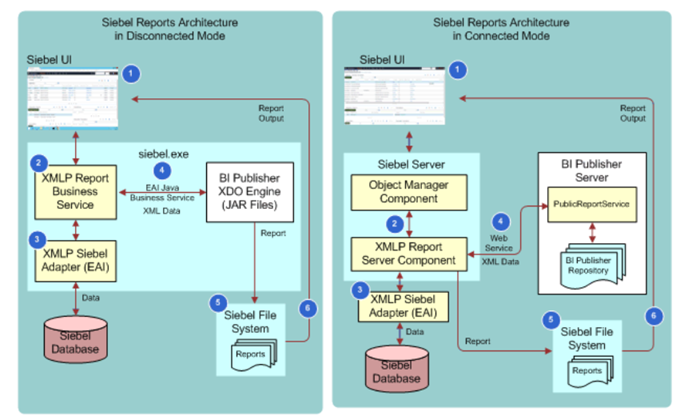
Integration Architecture
Data Flow
- Siebel Query: Business Component extracts data (Opportunity + Products + Account)
- XML Generation: Siebel converts data to XML format
- BI Publisher: Receives XML + Template → Merges data into layout
- Rendering: Generates PDF with company logo, formatting, page numbers
- Delivery: Returns PDF to Siebel UI or emails to customer
Example XML Data
<Opportunity>
  <Name>TechCorp 5G Upgrade</Name>
  <Account>TechCorp Industries</Account>
  <Revenue>250000</Revenue>
  <Products>
    <Product>
      <Name>5G Enterprise Plan</Name>
      <Quantity>500</Quantity>
      <Price>120</Price>
      <Total>60000</Total>
    </Product>
    <Product>
      <Name>5G Devices</Name>
      <Quantity>500</Quantity>
      <Price>380</Price>
      <Total>190000</Total>
    </Product>
  </Products>
</Opportunity>
Template Design
Template Types
- RTF Templates: Designed in Microsoft Word with BI Publisher Add-In (drag-drop fields, tables, charts)
- PDF Forms: Based on existing PDF forms (populate fields from CRM data)
- Excel Templates: Formatted Excel workbooks (pivot tables auto-populate)
Template Components
- Header/Footer: Company logo, page numbers, "Page 1 of 5"
- Fields: {Account.Name}, {Opportunity.Revenue}, {TODAY}
- Tables: Repeating product line items with subtotals
- Conditional Sections: IF Revenue > 100K THEN show approval signature block
- Charts: Revenue by month bar chart embedded in document
Common Use Cases
Use Case 1: Monthly Invoice Generation
- Requirement: Send itemized invoices to 5,000 customers
- Process: Scheduled job runs on 1st of month → Queries billing data → Generates 5,000 PDFs → Emails automatically
- Template: Corporate letterhead, itemized charges, subtotals, taxes, total due, payment instructions
- Localization: US customers see USD, European customers see EUR, invoices in local language
Use Case 2: Sales Quote Documents
- Requirement: Sales rep clicks "Generate Quote" → Professional PDF in 5 seconds
- Data: Opportunity details, line items with discounts, terms & conditions
- Template: Cover page with customer info, pricing table, contract terms (3 pages)
- Action: Rep attaches PDF to email and sends to prospect
Use Case 3: Regulatory Compliance Reports
- Requirement: Quarterly report to government agency (exact format required)
- Template: Government-provided PDF form with 50 fields
- Data: Siebel extracts subscriber counts, revenue, service metrics
- Output: Completed PDF form ready for submission
Report Bursting
Bursting: One report execution splits into thousands of personalized documents.
Example: Monthly Account Statements
- Query: Extract all active accounts + transactions
- Burst Key: Account ID (splits into one document per account)
- Output: 10,000 accounts = 10,000 PDFs generated
- Delivery: Each PDF emailed to account's primary contact automatically
Delivery Options
- Email: Attach PDF, customize subject/body per recipient
- FTP: Upload to partner server for processing
- Archive: Store in document repository for compliance (7-year retention)
- Print Queue: Send to networked printer for physical mailing
Configuration Steps
Setup Process
- Install BI Publisher: Separate server installation (Oracle middleware)
- Configure Integration: Siebel → BI Publisher connection (SOAP web service)
- Design Template: Create RTF template in Word with BI Publisher Add-In
- Upload Template: Upload to BI Publisher report catalog
- Create Report Definition: In Siebel Tools, define report (data query + template)
- Test: Run report with sample data, verify output
- Deploy: Make available to users or schedule automated runs
User Experience
- Siebel UI: User clicks "Generate Invoice" button on Account screen
- Processing: Progress indicator "Generating document... 3 seconds"
- Result: PDF opens in new browser tab (or auto-downloads)
- Actions: User can print, email, save to local disk, attach to SR
Best Practices
- Template Version Control: Store templates in source control (Git), track changes
- Performance: Limit data to necessary fields (don't extract entire database)
- Testing: Test templates with edge cases (100-line invoice, special characters, null values)
- Error Handling: If template merge fails, log error and notify admin (don't crash)
- Security: User sees only data they have access to (row-level security applied in Siebel query)