Interactive Dashboards
What are Dashboards?
Dashboards provide at-a-glance visualization of key metrics, combining charts, tables, and gauges on a single screen.
Dashboard Benefits
- Quick Insights: See pipeline health in 5 seconds (no need to run multiple reports)
- Visual Clarity: Red/yellow/green indicators show status instantly
- Drill-Down: Click chart segment → see detailed records
- Real-Time: Auto-refresh every 15 minutes (or on-demand)
- Personalized: Each user sees their own data (territory, team, region)
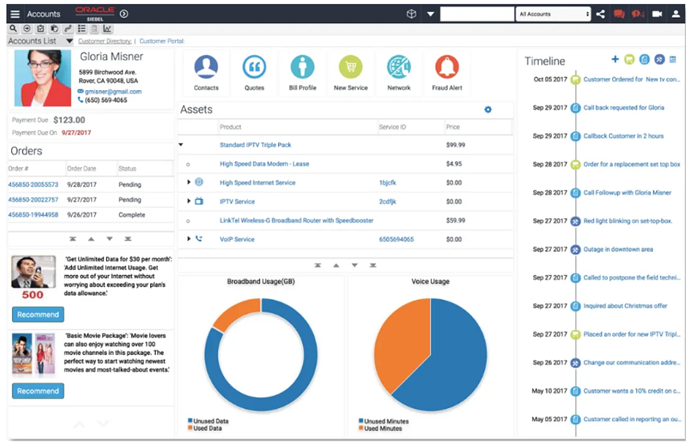
Dashboard Components
Widget Types
- KPI Tiles: Single metric with trend (Pipeline: $4.2M ↑12% vs last month)
- Gauges: Speedometer showing % to quota (85% of $5M quota)
- Bar Charts: Revenue by product line (compare 5 products side-by-side)
- Pie Charts: Opportunities by stage (Prospecting 40%, Negotiation 30%, Closed 30%)
- Line Charts: Trend over time (Won deals per week for last 12 weeks)
- Tables: Top 10 deals closing this month (sorted by revenue)
- Heat Maps: Territory performance grid (color-coded by quota attainment)
Layout Example: Sales VP Dashboard
+----------------------------------+----------------------------------+
| KPI: Pipeline                    | KPI: Win Rate                    |
| $12.5M (↑8% vs last month)      | 32% (↑2% vs last month)         |
+----------------------------------+----------------------------------+
| Chart: Pipeline by Stage         | Chart: Revenue by Territory      |
| [Bar chart: 5 stages]           | [Pie chart: 4 territories]      |
+----------------------------------+----------------------------------+
| Table: Top 10 Deals This Quarter                                    |
| [Account | Opp | Revenue | Stage | Close Date | Owner]            |
+---------------------------------------------------------------------+
Creating a Dashboard
Step-by-Step Process
- Navigate: Analytics → Dashboards → New Dashboard
- Name: "My Sales Dashboard"
- Layout: Choose template (2-column, 3-column, freeform)
- Add Widgets: Drag "KPI Tile" to top-left → Configure:
- Data Source: Opportunity BC
- Metric: SUM(Revenue)
- Filter: Status = 'Open'
- Label: "Open Pipeline"
- Add Chart: Drag "Bar Chart" to top-right → Configure:
- X-Axis: Sales Stage
- Y-Axis: COUNT(Opportunity ID)
- Color: By Stage
- Add Table: Drag "Table" to bottom → Configure:
- Columns: Account, Opportunity, Revenue, Close Date
- Filter: Close Date within next 30 days
- Sort: Revenue DESC
- Limit: Top 10
- Save: Click Save → Dashboard available in "My Dashboards"
Interactive Features
Drill-Down Example
Scenario: VP sees "Negotiation" stage has 15 opportunities worth $3.5M
- Action: Click "Negotiation" bar in chart
- Result: Pop-up shows list of all 15 opportunities with details
- Further Action: Click specific opportunity → Opens opportunity detail screen
Dynamic Filtering
- Territory Filter: Dropdown at top "Show: All Territories" → Select "Northeast" → All widgets update to show only Northeast data
- Date Range: Slider "Show: This Quarter" → Change to "Last 6 Months" → Charts redraw with 6-month data
- Product Line: Checkboxes "5G Plans, Devices, Enterprise" → Uncheck "Devices" → Dashboard excludes device deals
Auto-Refresh
- Setting: Configure dashboard to refresh every 15 minutes
- Use Case: Call center manager monitors real-time SR queue (updates automatically as new tickets arrive)
- Manual Refresh: User can click "Refresh" button for instant update
Role-Based Dashboards
Sales Rep Dashboard
- My Pipeline ($450K total)
- My Activities This Week (18 calls, 6 meetings)
- My Top 5 Deals Closing This Month
- My Win Rate (28% vs team avg 32%)
Sales Manager Dashboard
- Team Pipeline ($8.2M total, by rep)
- Team Quota Attainment (82% of $10M quota)
- Top Performers (leaderboard)
- Deals at Risk (stalled > 30 days)
Service Manager Dashboard
- Open SRs by Priority (5 Critical, 23 High, 67 Medium, 145 Low)
- SLA Compliance (92% met, 8% breached)
- Average Resolution Time (4.2 hours, target: 4.0)
- Agent Workload (cases per agent, color-coded)
Executive Dashboard
- Company-Wide Revenue (Q1: $45M, Q2 Forecast: $52M)
- Customer Acquisition Cost (CAC: $1,200 vs LTV: $8,400)
- Churn Rate (2.1% monthly, down from 2.8%)
- NPS Score (67, industry avg: 55)
Dashboard Sharing
Sharing Options
- Private: Only you can see (personal workspace)
- Team: Share with Sales Team (read-only for team members)
- Public: All users can view (company-wide visibility)
- Embedded: Embed dashboard in home screen (auto-displays when user logs in)
Export & Scheduling
- PDF Export: Click "Export" → Generates PDF snapshot → Email to stakeholders
- Scheduled Email: Dashboard auto-emails every Monday at 8 AM (executives receive weekly summary)
- PowerPoint Export: Export dashboard as .pptx slide for board meeting
Best Practices
- Limit Widgets: 5-7 widgets max (too many = cluttered, hard to read)
- Prioritize Top Metrics: Put most important KPIs in top-left (first thing user sees)
- Use Color Wisely: Green = good, red = bad, yellow = warning (consistent across all dashboards)
- Performance: Avoid complex queries in dashboards (use cached data for speed)
- Mobile-Friendly: Test on tablet/phone (reps check dashboard on mobile)
- Context: Add text annotations ("Pipeline down 5% due to end-of-quarter slowdown")