Key Performance Indicators (KPIs)
What are KPIs?
KPIs are measurable values that demonstrate how effectively an organization is achieving key business objectives.
KPI Characteristics
- Quantifiable: Numeric value (not subjective)
- Actionable: Teams can take action to improve the metric
- Relevant: Directly tied to business goals
- Time-Bound: Measured over specific period (monthly, quarterly)
- Benchmarked: Compared to targets or historical performance
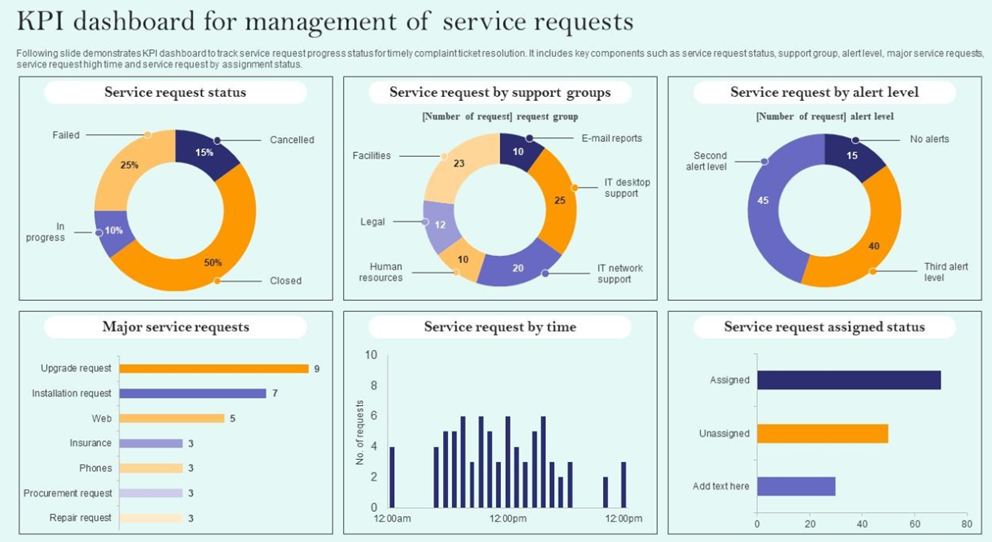
Common CRM KPIs
Sales KPIs
- Pipeline Coverage: Pipeline Value ÷ Quota (3x = healthy, 2x = at risk)
- Win Rate: Won Deals ÷ Total Deals × 100 (target: 30%)
- Average Deal Size: Total Revenue ÷ # Deals (track trend over time)
- Sales Cycle Length: AVG(Close Date - Created Date) in days (target: < 45 days)
- Quota Attainment: Closed Revenue ÷ Quota × 100 (85% = on track)
- Forecast Accuracy: Actual Revenue ÷ Forecasted Revenue × 100 (95-105% = accurate)
Service KPIs
- First Response Time: AVG(First Agent Response - SR Created) in hours (target: < 2 hours)
- Resolution Time: AVG(SR Closed - SR Created) in days (target: < 3 days)
- SLA Compliance: SRs Met SLA ÷ Total SRs × 100 (target: > 95%)
- CSAT Score: Average customer satisfaction rating 1-5 stars (target: > 4.2)
- First Contact Resolution: SRs Resolved in 1 Touch ÷ Total SRs × 100 (target: > 70%)
- Escalation Rate: Escalated SRs ÷ Total SRs × 100 (lower is better, target: < 5%)
Marketing KPIs
- Lead Conversion Rate: Leads → Opportunities ÷ Total Leads × 100 (target: 15%)
- Cost Per Lead (CPL): Campaign Budget ÷ Leads Generated (target: < $50)
- Marketing ROI: (Revenue - Campaign Cost) ÷ Campaign Cost × 100 (target: > 200%)
- Email Open Rate: Emails Opened ÷ Emails Sent × 100 (target: > 25%)
- Lead Velocity: # New Leads This Month vs Last Month (growth rate)
Configuring KPIs in Siebel
Step 1: Define KPI Metric
- Navigate to Administration → Analytics → KPI Definitions
- Click New KPI
- Enter details:
- Name: "Win Rate"
- Description: "Percentage of opportunities won vs total closed"
- Category: Sales
- Owner: Sales Operations
Step 2: Define Calculation
Numerator: COUNT(Opportunity) WHERE Status = 'Won'
Denominator: COUNT(Opportunity) WHERE Status IN ('Won', 'Lost')
Formula: (Numerator ÷ Denominator) × 100
Unit: Percentage (%)
Step 3: Set Thresholds
- Target: 30% (goal to achieve)
- Green Zone: ≥ 28% (performing well)
- Yellow Zone: 22-27% (needs attention)
- Red Zone: < 22% (critical, action required)
Step 4: Configure Visualization
- Display Type: Gauge (speedometer showing 0-40% range)
- Trend: Show 12-month line chart (spot trends)
- Comparison: Current month vs same month last year
Step 5: Set Refresh Schedule
- Frequency: Daily at 6 AM (overnight recalculation)
- Data Source: Opportunity BC (live data)
- Cache: Store result for 24 hours (performance)
KPI Hierarchy
KPIs roll up from individual → team → division → company.
Example: Pipeline Coverage
Company Level: $50M pipeline ÷ $15M quota = 3.3x coverage ✓
  ├─ Northeast Region: $20M ÷ $6M = 3.3x ✓
  │   ├─ NYC Team: $12M ÷ $4M = 3.0x ✓
  │   │   ├─ Rep A: $4M ÷ $1.5M = 2.7x ⚠️
  │   │   └─ Rep B: $8M ÷ $2.5M = 3.2x ✓
  │   └─ Boston Team: $8M ÷ $2M = 4.0x ✓
  ├─ Southeast Region: $15M ÷ $5M = 3.0x ✓
  └─ West Region: $15M ÷ $4M = 3.75x ✓
Insight: Rep A needs pipeline building (manager intervenes)
KPI Alerts & Notifications
Alert Configuration
- Trigger: Win Rate drops below 22% (red zone)
- Action: Email sent to Sales Manager
- Subject: "ALERT: Win Rate Critical - 20% (Target: 30%)"
- Body: "Your team's win rate has fallen to 20%, down from 28% last month. Review lost deals and adjust strategy."
- Frequency: Daily (until KPI returns to yellow/green)
Dashboard Integration
- KPI Widget: Display on manager's dashboard (auto-refresh)
- Color Coding: Red background if in red zone (visual alert)
- Drill-Down: Click KPI → See list of lost deals (root cause analysis)
Example: Service SLA Compliance KPI
KPI Definition:
- Metric: SLA Compliance Rate
- Formula: (SRs Resolved Within SLA ÷ Total SRs Closed) × 100
- Target: 95%
- Current Value: 92% (yellow zone)
- Trend: Down 3% from last month (was 95%)
Root Cause Analysis
- Drill-Down: Click KPI → View breached SRs
- Finding: 80% of breaches are "Hardware Issue" category
- Further Analysis: Hardware team understaffed (6 agents, need 9)
- Action: Hire 3 more hardware specialists
- Expected Result: SLA compliance returns to 96% within 2 months
Best Practices
- Limit KPIs: Track 5-7 key metrics (not 50 - causes confusion)
- Align to Goals: Each KPI ties to strategic objective (e.g., "Grow revenue by 20%")
- Ownership: Assign owner for each KPI (accountable for improvement)
- Regular Review: Weekly review in team meetings (celebrate wins, address issues)
- Historical Tracking: Store 2+ years of data (identify long-term trends)
- Benchmarking: Compare to industry standards (is 30% win rate good or bad?)
- Leading vs Lagging:
- Lagging: Revenue (tells you what happened)
- Leading: # Demos Scheduled (predicts future revenue)